Your place,
in a webspace.
Scan a room, a garden, or a thing you love with your phone. Then put it in a web page your friends can walk into with you, from a link, in any browser or headset. It takes about twenty minutes and needs no special software.
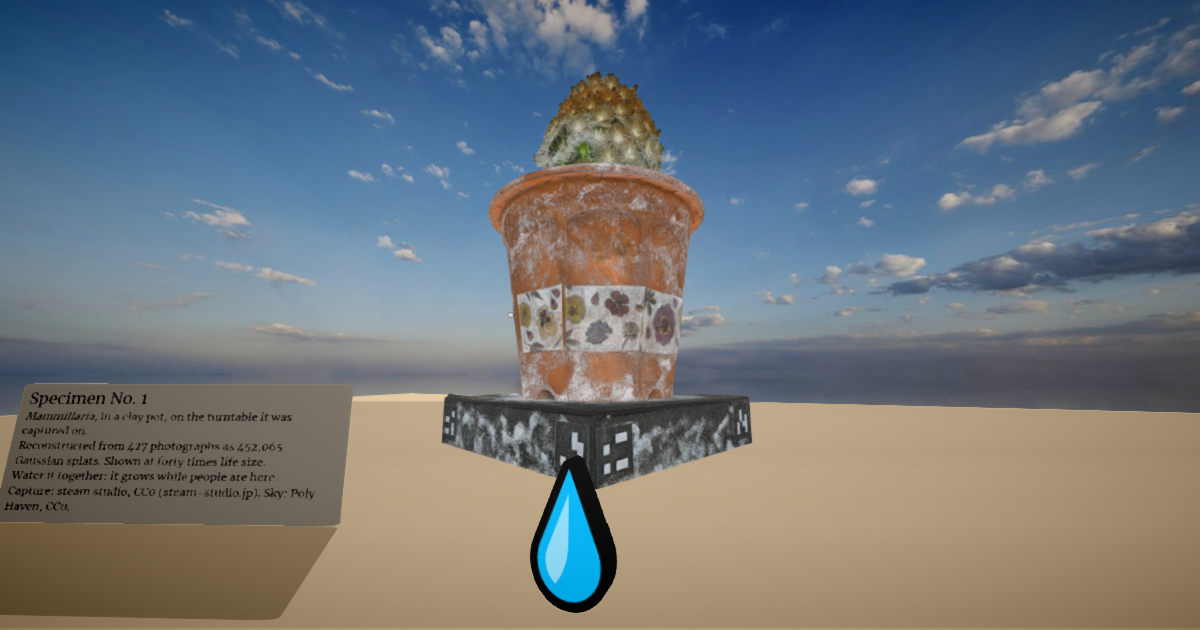
Step 1Capture it
Use a Gaussian splat capture app on your phone. Scaniverse, Polycam, and Luma all work; Scaniverse is free and processes on the phone. Walk slowly around your subject, keeping it centered and well lit.
- Objects (a plant, a sculpture, a pair of shoes): circle it twice, once high and once low.
- Rooms and outdoor spots: stand near the middle and turn slowly, then walk the edges.
- Avoid shiny, transparent, and moving things. They capture as fuzz.
Export the result as .spz if the app offers it (it's about ten times smaller), otherwise .ply.
Step 2Make a world for it
Open the starter template, click Use this template to make your own copy, then turn on Settings → Pages (deploy from main). In a minute you'll have a live world at https://<you>.github.io/<repo>/.
Step 3Tidy the capture (optional, recommended)
Most .ply captures come out upside down and off-center. A small converter fixes both, trims the floor if you like, and shrinks the file. It's plain Node with no installs:
curl -O https://raw.githubusercontent.com/webspace-sdk/showcase/main/specimen/make/splat2spz.mjs
curl -O https://raw.githubusercontent.com/webspace-sdk/showcase/main/specimen/make/spz-writer.mjs
curl -O https://raw.githubusercontent.com/webspace-sdk/showcase/main/specimen/make/splat-loader.mjs

node splat2spz.mjs my-scan.ply my-scan.spz --flip --center
--flip turns it upright, --center puts its footprint at the origin with its base at ground level, --crop-below=0.05 trims a floor or turntable, and --max-splats=300000 keeps big captures quick to load.
Step 4Put it in the page
Add the .spz file to your repo next to index.html, and add one line inside <body>. Splats keep their real-world size. First, in <head>, change the terrain from hills to flat, so the ground is level at 75cm. The starter's sample tree, lantern, and apple were placed for the hills, so delete them (or lower them). Then this stands your scan in front of you:
<meta name="webspace.environment.terrain.type" content="flat" />
<model id="my-scan" src="my-scan.spz"
  style="transform: translate3d(0cm, 75cm, -300cm)"></model>
Make it a monument with scale3d(4, 4, 4), spin it with rotateY(1rad), or, if it's a whole room, put it at translate3d(0cm, 75cm, 0cm) and stand inside it.
For places that are bigger than a room, add these to <head> so you can see far, and give the scene a real sky:
<meta name="webspace.environment.fog" content="off" />
<meta name="webspace.environment.sky" content="sky.jpg" />
Any 360° photo works as sky.jpg. Poly Haven has hundreds of free ones: download the tonemapped JPG and resize it to 4096×2048.
Step 5Share it
Commit, wait a minute, and send the link. Everyone who opens it is there together, with voice. On a Quest, they can press Enter VR and stand in it.
Want more? Add a sign (<label>), some free models, or a little script so touching something does something for everyone. The recipes show how, and llms.txt teaches all of it to your AI agent: "put my scan on a little hill at sunset and add a bench facing it."